 Ricardo Rodrigues
I’ve been working on a side project called Comilito. It’s a desktop soundboard and mixer for Dungeons & Dragons Dungeon Masters, made to prepare the sounds of a campaign ahead of time and play them live during a session.
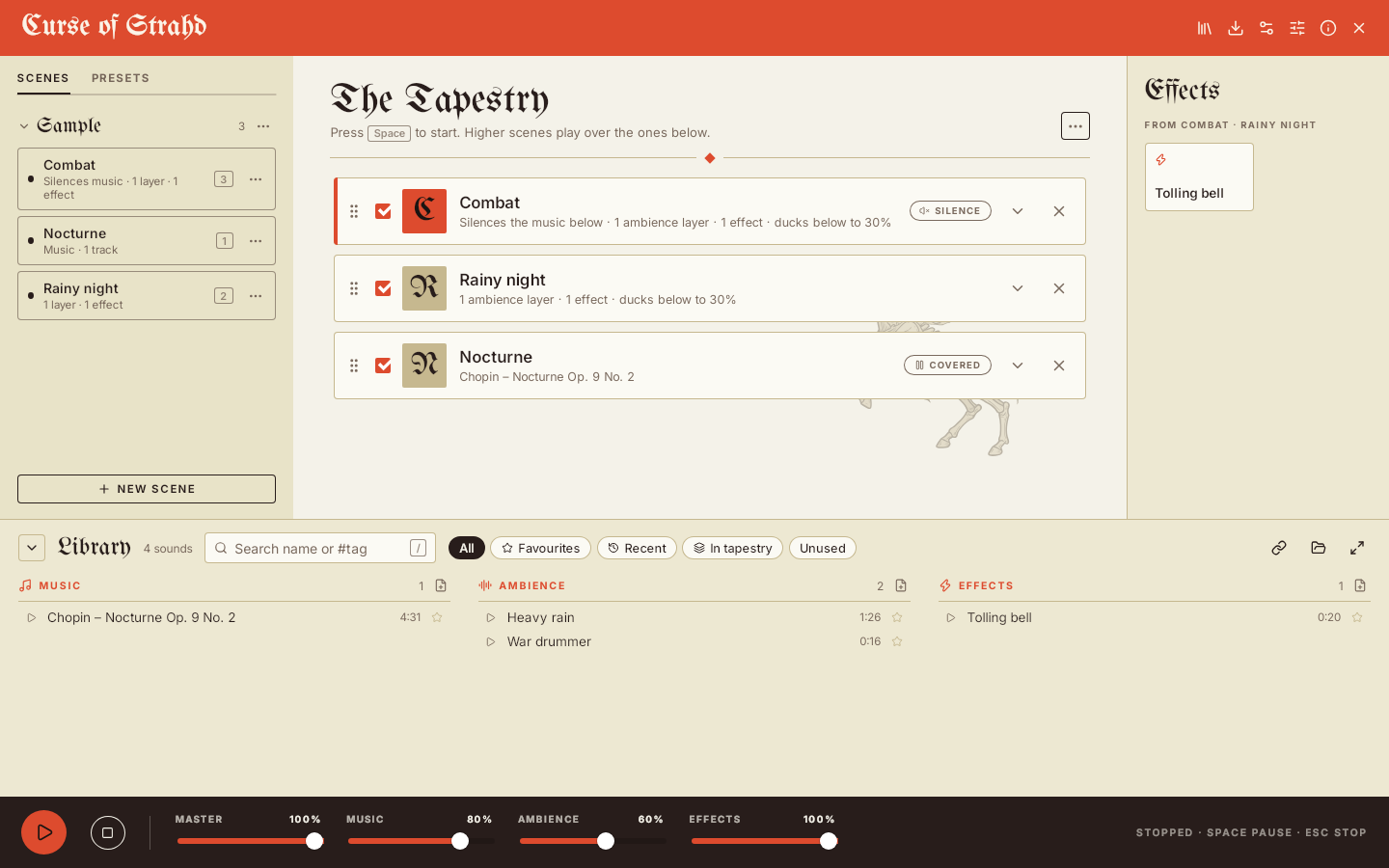
Sounds, scenes and the Tapestry
Comilito sorts sounds into three categories:
- Music: background tracks, usually one at a time, with crossfades between them.
- Ambience: looping layers such as rain, tavern chatter or wind, which can be stacked.
- Effects: short one-shot sounds such as a door slam, a dragon’s roar or a spell being cast.
Every category and every sound has its own volume, and each sound has its own loop and fade settings.
Sounds are combined into scenes. A scene can have a music playlist, a few ambience layers, effects for the pad, and a hotkey.
The part I’m happiest with is how scenes combine. During a session you stack them in what the app calls the Tapestry. Scenes higher in the stack play over the ones below: they duck the ambience underneath, and the top-most scene with music decides what plays. In the screenshot above, Combat sits on top of Rainy night and Nocturne. The combat drums come in, the rain fades into the background, and the nocturne is silenced. Take Combat off the stack and everything goes back to how it was. Stacks you use often can be saved as presets and brought back with one drag.
At the table, Space pauses and resumes, Esc stops everything, and scene hotkeys add or toggle scenes without reaching for the mouse.
Everything else
- One project per campaign. Each project is a plain folder with its settings and its own audio. It’s saved automatically and backed up. Put the folder somewhere synced to use it on several computers.
- Export and import a whole project as one
.comilitofile, with or without the audio. If the audio is left out, Comilito asks you to point it at the missing files on import. - Loudness normalisation, so a quiet recording and a loud one play at a similar level.
- A library with folders, tags, favourites, search and smart lists for recent, unused and missing sounds.
- Downloads from YouTube and other sites through yt-dlp, or from direct audio links, optionally only part of a long video.
- Cropping sounds on their waveform.
- Themes, including your own, and the desktop’s accent colour.
How it’s built
Comilito is a Tauri 2 app, so it uses the operating system’s webview instead of bundling a whole browser. The audio engine and file handling are written in Rust, on top of kira. The interface is Svelte with TypeScript. It runs on Linux and Windows, and macOS and Android are planned.
I built Comilito with the help of AI (Claude, through Claude Code). I directed the design and made the decisions, and it helped with much of the implementation. It was also an interesting experiment in working that way on a real project of my own.
What’s next
Nothing has been released yet, as I’m still polishing the first version. Next on the list are a first-time experience for new users, choosing the audio output device, and eventually plugins. One idea I’d like to try is a plugin that plays a video for the top scene in a separate window.
I’ll post here when there’s something to download.